
Version 5.0 brings two new modules, a reworked Launcher, a Field Inspector that works without DB Browser, a brand refreshed documentation site, and a large security overhaul under the hood. At the end of this post I look back at ten years of Sitecore Extensions.
New features
Favorites
Every project has the same few items you jump to all the time: settings, a site root, a dictionary folder. Now you can star them.
Click the star in the Content Editor header, or run Add to favorites from the Launcher. Your favorites then show up as Launcher commands, so the item you need is just Ctrl + Space and a few letters away.
Each favorite has a scope:
- This instance - the favorite is shown only on the Sitecore instance where you saved it,
- Any instance - the favorite is shown everywhere,
- Matching hosts - the favorite is shown on hosts matching a wildcard pattern such as
*.cm. Patterns match the whole hostname, ignoring case and port. The item opens on the host you are currently on, so one favorite works for local, test and production CM servers.
You can change the scope from the Launcher with Change favorite scope, or manage everything (hosts, patterns, default scope, ordering) under Options → Modules → Favorites.
Favorites can also be included when you export your settings, so moving to a new machine doesn’t mean starting from scratch.
GUID formats
How many times have you copied an item ID only to strip the braces, lowercase it, or remove the dashes for a Solr query? The new GUID command in the Launcher copies the current item ID in the format you need:
| Format | Example |
|---|---|
| Braced upper | {110D559F-DEA5-42EA-9C1C-8A5DF7E70EF9} |
| Braced lower | {110d559f-dea5-42ea-9c1c-8a5df7e70ef9} |
| Plain upper | 110D559F-DEA5-42EA-9C1C-8A5DF7E70EF9 |
| Plain lower | 110d559f-dea5-42ea-9c1c-8a5df7e70ef9 |
| Search lowercase | 110d559fdea542ea9c1c8a5df7e70ef9 |
| Short ID | 110D559FDEA542EA9C1C8A5DF7E70EF9 |
| URL encoded | %7B110D559F-DEA5-42EA-9C1C-8A5DF7E70EF9%7D |
Need a fresh one? New random GUID generates a new GUID and shows it in all formats.
Nested Launcher commands
Some commands are really a group of options, like the GUID formats above. Instead of flooding the list, the Launcher now supports nested commands: pick the parent and you get a second list with its options. It keeps the main list short and makes room for more commands in the future.
Documentation site
The old GitHub wiki has been replaced with a dedicated documentation site: alan-null.github.io/sc_ext.
Updated features
Field Inspector without DB Browser
Recent Sitecore versions removed DB Browser.aspx, and Field Inspector depended on it. Not anymore:
- field IDs come from the field’s editor control or from the item’s Reset Fields dialog,
- field names come from the Sitecore Item Service (
/sitecore/api/ssc/item), - Reset Field now uses the item’s current language and version, and reloads that version.
If the Item Service is switched off on your instance, the field name toggle shows a warning. Go to field and Reset Field keep working.
Item Service JSON command
There is a new admin command in the Launcher: Item Service JSON?id=CurrentItem. It opens the raw field values of the current item (standard fields included) as JSON in a new tab. DB Browser.aspx?id=CurrentItem falls back to it when DB Browser is not available.
Launcher keyboard improvements
- Global commands work again. Shell and navigation commands that open a new tab are fixed.
- Rich Text Editor. Pressing
Ctrl + Spaceinside the RTE now opens the main Launcher instead of creating a second one inside the editor frame. - Page shortcuts come first. If a page already handles the Launcher shortcut (for example, autocomplete in an Ace code editor), the page wins. The Launcher opens only when nothing else claimed the key.
Under the hood
Most of this release you won’t see, but it matters. The extension used to inject a lot of code straight into Sitecore pages. In 5.0 the extension code is isolated from the page, and only a small bridge talks to Sitecore.
On top of that:
- the bridge ignores forged messages sent by the page,
- extension events can no longer be forged by page scripts,
- message deserialization uses an explicit allow list of types,
- source maps are no longer shipped in release packages.
The extension also has a privacy policy now. Short version: your data stays in your browser.
Bug fixes
- Using Launcher commands, or just pressing keys while the Launcher was open, could mark a clean Content Editor item as modified. You no longer get a “do you want to save?” prompt for changes you never made.
- Fixed the
ctl.className.indexOf is not a functionconsole error coming from the Quick Info section.
Full list on GitHub.
“The Last” release
Ten years of small improvements
It started on April 16, 2016, with a simple goal: make Sitecore just a little bit nicer to work with every day. Here is how it went:
- 1.0 (May 2016) - the first public version: the Launcher, Section Switches, Database Name and Database Color, built for Sitecore 7 and 8.
- 2.0 (June 2016) - an options page for every module, Field Search, opening commands in a new window, and Sitecore Applications and Launchpad commands in the Launcher.
- 3.0 (September 2016) - Field Inspector, Tree Scope, Tree Auto Expand, floating database name and new admin shortcuts from Sitecore 8.2.
- 3.1 to 3.4 (2016-2020) - self-defined links, settings export and import, resetting a single field to its standard value, deep links to items, External Links, Add Here with placeholder names, and notifications.
- 4.0 (March 2023) - migration to Manifest V3, a Docker setup for development, opening items in a new tab with
Ctrl + Enter, and removing all components from a placeholder. - 4.1 (October 2025) - the Quick Info Extender (copy and navigate to an ID) and module status in the popup.
- 5.0 (November 2026) - Favorites, GUID formats, nested commands, a documentation site, and a secure foundation to finish on.
Over those ten years the extension followed Sitecore from version 7.0 to XM Cloud. It went from Chrome to Edge, Firefox, Opera and Vivaldi, and passed 240 commits and nearly 180 GitHub issues and pull requests. Most of the work happened in 2016, and then it came back in bursts whenever I had inspiration or time to work on it.
Ten years of users
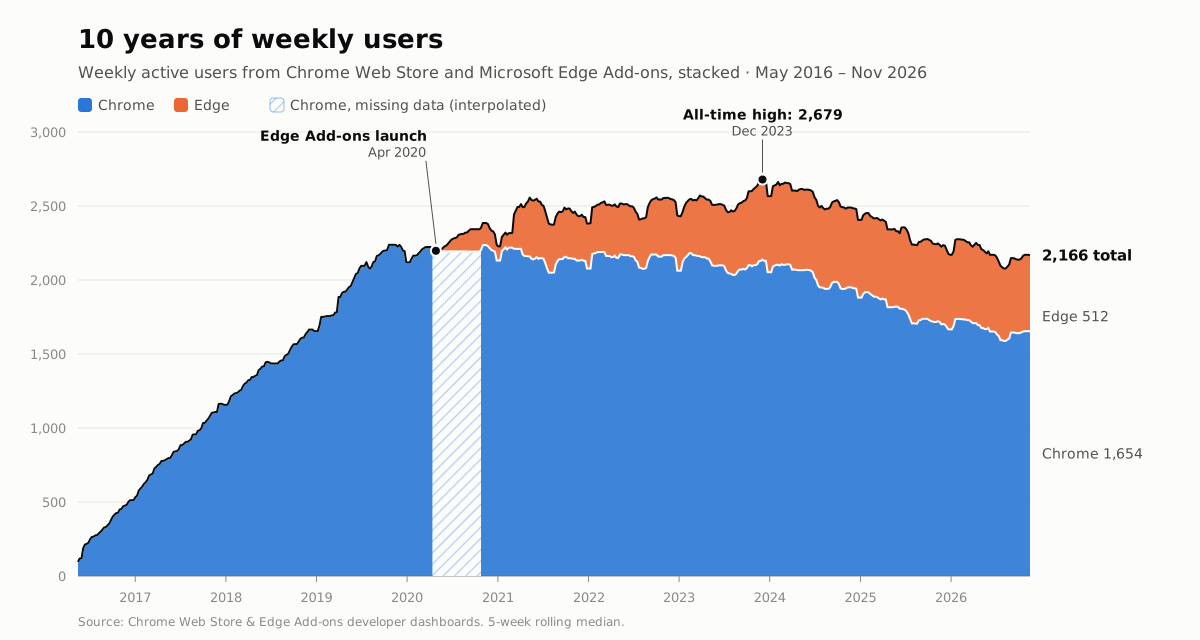
None of this would make sense without you. The number of weekly users grew steadily from the first release until 2020.
The Edge Add-ons listing then added a new group of users on top. Usage peaked at 2,679 weekly users in December 2023. Today, ten years after the first release, more than 2,100 people still use Sitecore Extensions every week.
Why this is the last one
Sitecore Extensions isn’t going away. If something needs fixing for security reasons, I will still release a fix. But 5.0 is the last release with new features.
The reason is personal. For me, this project is like a photo album. When I look at a module, I remember writing it: the day, the place, what was going on in my life at the time. These ten years of code hold a lot of memories.
More and more code today is written with AI, and that’s fine. But I don’t want AI to change the code that holds those memories. I want to keep it the way it is, so I’m closing the album here, at version 5.0.
Thank you
Thanks to everyone who used it, reported bugs, suggested features and sent pull requests.
It was a great ride. I hope Sitecore Extensions saved and will continue to save you a few clicks every day!
Useful links: